
Screenshots
About iOS 17 Launcher - Phone 15 Pro
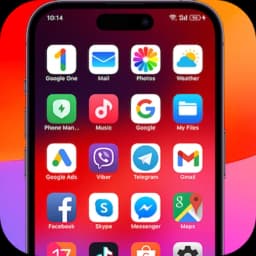
Transform your Android device into an iOS experience with iOS 17 Launcher - Phone 15 Pro. This launcher brings the sleek aesthetics and intuitive interface of the latest iPhone directly to your Android phone, complete with redesigned icons, wallpapers, and lock screen styling that mirror iOS 17.
The launcher prioritizes efficiency without sacrificing visual appeal. It uses minimal RAM and battery power, letting your device run smoothly throughout the day. You get the polished iOS look while retaining Android's flexibility and functional capabilities — the best of both platforms working together seamlessly.
Customization sits at the heart of this launcher. Rename and redesign app icons to match your personal style, organize apps into folders with simple drag-and-drop actions, and hide apps from your home screen as needed. The App Library automatically categorizes your applications just like iOS does, making everything easy to find. If you want a cleaner home screen, you can keep certain apps tucked away without uninstalling them.
Stay informed without distraction. The Today View widget displays weather forecasts, calendar events, and your favorite contacts at a glance. A dedicated weather widget shows temperature, humidity, and wind conditions right on your home screen, so you always know what to expect. Unread notification dots alert you to pending messages and missed updates, so nothing slips past you.
Privacy matters. The Lock App feature adds an extra layer of security, preventing unauthorized access to your applications. Your personal data stays protected while you enjoy the launcher's features.
Advertisement removal and additional customization options are available through TurboKey features, giving you a distraction-free experience and more control over your device's appearance.
iOS 17 Launcher - Phone 15 Pro works on Android 5.0 and higher, making it accessible to a wide range of devices. Whether you prefer the iPhone aesthetic or simply want a more refined launcher experience, this app delivers a polished, secure, and efficient interface transformation that respects your device's performance.
Pros & Cons
Pros
- Minimal RAM and battery usage keeps your device responsive all day
- App Library automatically categorizes and organizes applications like iOS
- Lock App feature adds password protection to individual applications
- Customize icon designs and rename apps to match your personal style
- Today View widget displays weather, calendar events, and contacts at once
Cons
- Premium customization and ad removal require TurboKey paid features
- Launcher aesthetic is iOS imitation, not genuine iOS functionality
- App Library organization may differ from your preferred workflow
- Lock App security depends on launcher remaining your default launcher
Related Apps

AlienGUIse
Desktop themes and manager for Windows — transform your system with 5 futuristic designs.

SharpKeys
Remap keyboard keys to launch apps, media controls, and custom commands on Windows.

RocketDock
Desktop launcher for Windows — quick access dock with customizable icons and positioning.

Custom Resolution Utility (CRU)
Display resolution utility: Create custom resolutions for your monitor with precise refresh rate control.

Lagguy Wallpapers
Lagguy
4K & HD wallpapers for Android — minimal, abstract, nature, AMOLED designs with lifetime access

Lock Screen OS
Apps Genz
Customize your lock screen with widgets, photos, and notifications. Replace Android's default lock screen.
Latest Articles

7 best Anki alternatives for desktop in 2026 (we tested every one)
Jul 11, 2026

7 best AppFlowy alternatives for desktop in 2026 (self-hosted included)
Jul 11, 2026

Best AI admin task automation apps for desktop in 2026 (we tested 7)
Jul 11, 2026

Best AI coding tutor apps for desktop in 2026 (we tested 7)
Jul 11, 2026
Best apps for AI red teaming on desktop in 2026 (free and paid)
Jul 11, 2026